Kalshi API: how to use it, with tested Python and TypeScript
12 min read
By the Totalis team. We build the combo platform for prediction markets on Hyperliquid.
The Kalshi API is free to use, and its market data needs no account or key.
You read events, markets, order books and trades with plain GET requests
to https://external-api.kalshi.com/trade-api/v2. Placing orders, reading
your portfolio and opening the WebSocket need an API key: a key pair you
create in your Kalshi account, with every request signed by the private key.
Kalshi also offers a FIX API, a demo environment with mock funds,
official Python and TypeScript SDKs, and an MCP connector for AI assistants.
Every example below ran against the live API on 11 November 2026.
Contents
This is a developer guide, not financial or legal advice. New to the exchange? Start with what Kalshi is and how it works.
How does the Kalshi API work?#
Kalshi runs one Trade API for its event contracts, which it calls the Predictions API, and a separate one for perpetual futures. Kalshi's API environments page lists the hosts:
| Surface | Production | Demo | Key needed |
|---|---|---|---|
| REST | https://external-api.kalshi.com/trade-api/v2 | https://external-api.demo.kalshi.co/trade-api/v2 | Only for trading and account routes |
| WebSocket | wss://external-api-ws.kalshi.com/trade-api/ws/v2 | wss://external-api-ws.demo.kalshi.co/trade-api/ws/v2 | Yes, at the handshake |
| FIX 5.0 SP2 | mm.fix.elections.kalshi.com and marketdata.fix.elections.kalshi.com | fix.demo.kalshi.co | Yes; some sessions by application |
| MCP connector | https://api.elections.kalshi.com/mcp | None | Only for portfolio and alert tools |
The older host https://api.elections.kalshi.com/trade-api/v2 still works and serves every market, not only elections, so older code that uses it keeps running. Demo keys work only on demo and production keys only on production.
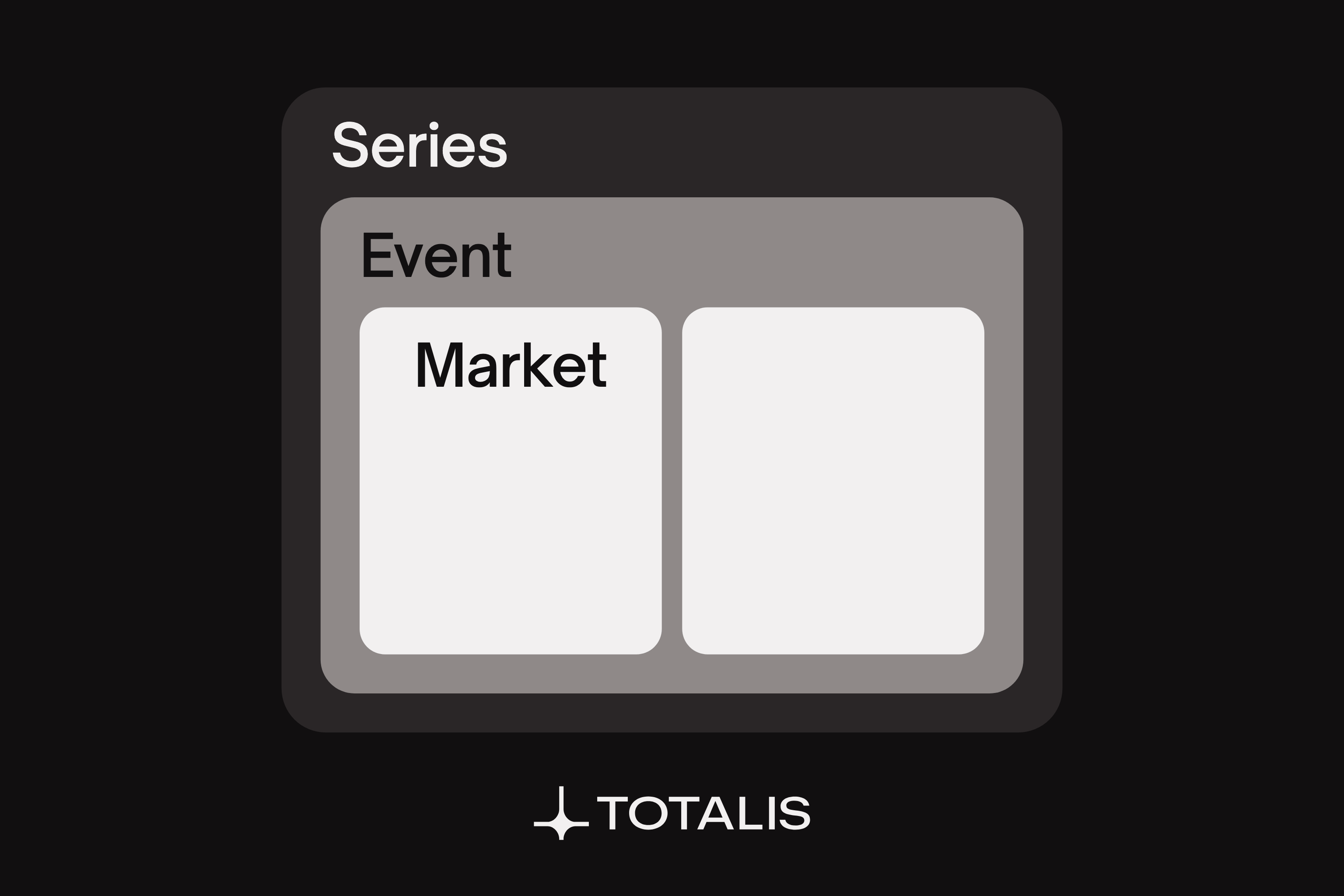
Kalshi's data model has three levels. A series is a recurring question, such as KXFEDDECISION for Fed rate decisions. An event is one instance of it, such as KXFEDDECISION-26DEC for the 9 December 2026 meeting. A market is one Yes or No contract inside the event, such as KXFEDDECISION-26DEC-H25, "Hike 25bps". Kalshi's fixed-point page sets the formats: prices are dollar strings ending in _dollars with up to 4 decimals, and contract quantities are strings ending in _fp with up to 2, because some markets allow fractional contracts. Parse both as decimals, not floats.
Does Kalshi have a public API?#
Yes. Kalshi's market data quick start says its public endpoints "don't require API keys". The three examples below use only those. We ran them on 11 November 2026 with Python 3.14, requests 2.34 and Node 24, which runs a .ts file as is.
Example 1: list every outcome of an event (Python)#
import requests

BASE = "https://external-api.kalshi.com/trade-api/v2"

r = requests.get(
    f"{BASE}/events/KXFEDDECISION-26DEC",
    params={"with_nested_markets": "true"},
    timeout=10,
)
r.raise_for_status()
event = r.json()["event"]

print(event["title"], "|", event["sub_title"])
for m in event["markets"]:
    print(
        f'{m["ticker"]:<26} {m["yes_sub_title"]:<22} '
        f'bid {m["yes_bid_dollars"]}  ask {m["yes_ask_dollars"]}  '
        f'volume {m["volume_fp"]}'
    )
Output at 10:00 UTC on 11 November 2026, Kalshi market data, trimmed to two of the five lines:
Fed decision in Dec 2026? | On Dec 9, 2026
KXFEDDECISION-26DEC-H0     Fed maintains rate     bid 0.0400  ask 0.0500  volume 2044541.18
KXFEDDECISION-26DEC-H25    Hike 25bps             bid 0.8400  ask 0.8500  volume 2250585.76
On Kalshi at that time, a Yes ask of 0.85 meant traders put the chance of a 25 basis point hike at about 85%. How prices turn into payouts is in prediction market odds and payouts, and this same market is covered as a trade in our Fed rate decision guide. Without with_nested_markets=true, the markets come back in a separate top-level markets array instead of inside the event.
Example 2: read the order book and find the ask (Python)#
Kalshi's order book has no asks. It returns Yes bids and No bids only, because a No bid at 0.15 is the same as a Yes offer at 0.85. Kalshi's order book guide says both arrays are sorted in ascending order, so the best bid is the last element.
from decimal import Decimal

import requests

BASE = "https://external-api.kalshi.com/trade-api/v2"
TICKER = "KXFEDDECISION-26DEC-H25"

r = requests.get(f"{BASE}/markets/{TICKER}/orderbook", params={"depth": 3}, timeout=10)
r.raise_for_status()
book = r.json()["orderbook_fp"]

yes_bids = book["yes_dollars"]
no_bids = book["no_dollars"]
print("yes bids:", yes_bids)
print("no bids: ", no_bids)

best_yes_bid = Decimal(yes_bids[-1][0])
best_no_bid = Decimal(no_bids[-1][0])
print("best yes bid:", best_yes_bid)
print("best yes ask:", Decimal(1) - best_no_bid)
Output at 10:00 UTC on 11 November 2026, Kalshi market data:
yes bids: [['0.8200', '1320.53'], ['0.8300', '11174.98'], ['0.8400', '73427.87']]
no bids:  [['0.1300', '1473.31'], ['0.1400', '32006.86'], ['0.1500', '16956.93']]
best yes bid: 0.8400
best yes ask: 0.8500
The derived ask matches the yes_ask_dollars from Example 1. depth=3 returns the top three levels per side, still in ascending order.
Example 3: page through a day of trades (TypeScript)#
List endpoints return a cursor. Send it back until it comes back empty. The maximum page size is 1,000.
const BASE = "https://external-api.kalshi.com/trade-api/v2";
const ticker = "KXFEDDECISION-26DEC-H25";
const since = Math.floor(Date.now() / 1000) - 24 * 60 * 60;

type Trade = { count_fp: string; yes_price_dollars: string };
type Page = { trades: Trade[]; cursor: string };

let cursor = "";
let pages = 0;
let contracts = 0;
let notional = 0;

do {
  const url = new URL(`${BASE}/markets/trades`);
  url.search = new URLSearchParams({
    ticker,
    min_ts: String(since),
    limit: "1000",
    cursor,
  }).toString();
  const res = await fetch(url);
  if (!res.ok) throw new Error(`${res.status} ${await res.text()}`);
  const page: Page = await res.json();
  for (const t of page.trades) {
    const n = Number(t.count_fp);
    contracts += n;
    notional += n * Number(t.yes_price_dollars);
  }
  pages += 1;
  cursor = page.cursor;
} while (cursor);

console.log(`${ticker}, last 24 hours`);
console.log(`pages: ${pages}`);
console.log(`contracts traded: ${contracts.toFixed(2)}`);
console.log(`volume-weighted Yes price: ${(notional / contracts).toFixed(4)}`);
Output at 10:00 UTC on 11 November 2026, Kalshi market data:
KXFEDDECISION-26DEC-H25, last 24 hours
pages: 1
contracts traded: 721428.99
volume-weighted Yes price: 0.8530
That day fit in one page of 973 trades, and the total agrees with the market's own volume_24h_fp field to within the few seconds between the two calls. min_ts and max_ts are Unix seconds. Older trades, markets and orders move to separate /historical/ endpoints once they pass a cutoff that GET /historical/cutoff returns, per Kalshi's historical data page. Code that only reads the live endpoints will miss old data.
Is the Kalshi API free?#
Yes. Kalshi's docs list no subscription or data fee. Public market data needs no account, and API keys come with any Kalshi account: Kalshi's rate limits page says the Basic tier needs only a completed signup. What costs money is trading: every fill carries a trade fee from Kalshi's fee model plus a small rounding adjustment, per Kalshi's fee rounding page. Our Kalshi fees guide breaks the fee model down.
Two documents set the terms. Kalshi's Developer Agreement (version 1.1) says "use of Kalshi APIs is expressly limited to facilitating a members own trading on the Exchange". Section 3.1 bars "collecting, caching, aggregating, or storing" API data except to facilitate your own trading on Kalshi, and sharing it with third parties "in any manner" without Kalshi's prior written authorization. Section 3.2 bars facilitating trading by other members, and section 6.4 asks for Kalshi's prior written approval before public statements or disclosures relating to Kalshi or its API. The agreement also says that accessing the API counts as accepting it. Kalshi's data terms of use, which cover data on its website, add a ban on using Kalshi data for machine learning or AI. By that text, a public dashboard or a data product needs Kalshi's written authorization, and an app that trades for other members is outside what the agreement allows.
How do I get a Kalshi API key?#
- Open a Kalshi account. Whether you can sign up from your country is covered in is Kalshi legal.
- In Kalshi's profile settings, find API Keys and choose Create New API Key. Kalshi's API keys page says Ed25519 is selected by default and RSA is the fallback for older clients. You can also register a public key you generated yourself, so the private key never leaves your machine.
- Save the private key and the Key ID at once. Kalshi does not store the private key and cannot show it again.
- For testing, create a separate account on the demo environment, which uses mock funds. Its keys do not work on production.
How to sign a Kalshi API request#
Every authenticated request carries three headers: KALSHI-ACCESS-KEY (the Key ID), KALSHI-ACCESS-TIMESTAMP (Unix milliseconds) and KALSHI-ACCESS-SIGNATURE. The signature is the base64 of your private key's signature over the timestamp, the HTTP method and the path joined together, with no query string. An Ed25519 key signs that string directly; an RSA key signs it with RSA-PSS and SHA-256.
We have no Kalshi account, so we could not make a successful signed call. To see what a broken setup returns, we generated a fresh Ed25519 key that Kalshi has never seen and signed a balance request with it:
import base64
import time
import uuid

import requests
from cryptography.hazmat.primitives.asymmetric.ed25519 import Ed25519PrivateKey

BASE = "https://external-api.kalshi.com"
PATH = "/trade-api/v2/portfolio/balance"

key_id = str(uuid.uuid4())
private_key = Ed25519PrivateKey.generate()


def signed_headers(method: str, path: str) -> dict[str, str]:
    ts = str(int(time.time() * 1000))
    message = ts + method + path.split("?")[0]
    signature = base64.b64encode(private_key.sign(message.encode())).decode()
    return {
        "KALSHI-ACCESS-KEY": key_id,
        "KALSHI-ACCESS-TIMESTAMP": ts,
        "KALSHI-ACCESS-SIGNATURE": signature,
    }


r = requests.get(BASE + PATH, headers=signed_headers("GET", PATH), timeout=10)
print(r.status_code, r.text)
r = requests.get(BASE + PATH, timeout=10)
print(r.status_code, r.text)
Output at 10:02 UTC on 11 November 2026:
401 {"error":{"code":"authentication_error","message":"We could not authenticate your request","details":"NOT_FOUND"}}
401 {"error":{"code":"token_authentication_failure","message":"token authentication failure"}}
With a real key, swap key_id for your Key ID and load your private key from its PEM file. The two errors tell you where you are stuck:
| Response | What it means |
|---|---|
token_authentication_failure | No auth headers reached Kalshi. Check that your client sends them |
authentication_error with NOT_FOUND | Kalshi does not know the Key ID. Check you are on the right environment |
If Kalshi knows your key and still refuses, recheck the parts that are signed: the millisecond timestamp, the upper-case method, the path without its query string, and the algorithm for your key type.
What are the Kalshi API rate limits?#
Kalshi meters authenticated traffic in tokens. Each tier refills a read bucket and a write bucket at a set number of tokens a second, most requests cost 10 tokens, and GET /account/endpoint_costs lists the ones that cost more or less. Budgets for event contracts, as of 11 November 2026:
| Tier | Read tokens a second | Write tokens a second | How you get it |
|---|---|---|---|
| Basic | 200 | 100 | Complete signup |
| Advanced | 300 | 300 | Call the upgrade endpoint, after placing an API order |
| Expert | 600 | 600 | 0.075% of exchange volume |
| Premier | 1,200 | 1,200 | 0.125% |
| Paragon | 2,400 | 2,400 | 0.25% |
| Prime | 4,800 | 4,800 | 0.50% |
| Prestige | 12,000 | 9,600 | 1.00% |
Advanced is permanent once granted, but Kalshi's upgrade endpoint grants it only if at least 1 of your last 100 orders was created through the API; otherwise it returns HTTP 403. Volume tiers count your trailing 30-day volume against twice the previous month's exchange volume, and Kalshi reviews them daily. Other rules from the rate limits page:
- Basic and Advanced read buckets hold 3 seconds of budget, so an idle client can burst to 3 times its rate. A Basic write bucket holds 1 second.
- A batch costs the same as its orders sent one by one: 25 orders cost 250 tokens, and the whole batch must fit in the bucket.
GET /portfolio/balancehas its own bucket: once a second on Basic and Advanced, five times above that.- A limited request gets
429with{"error": "too many requests"}and noRetry-Afterheader. There is no cooldown, so back off and retry.
How do I use the Kalshi WebSocket?#
Connect to wss://external-api-ws.kalshi.com/trade-api/ws/v2 with the same three headers, signing timestamp + "GET" + "/trade-api/ws/v2". Kalshi's WebSocket quick start says authentication is required at the handshake even for public market data. We tried without headers on 11 November 2026, and the server refused with HTTP 401 before any subscription.
Once connected, you subscribe to channels by name. Public market channels include ticker, trade and market_lifecycle_v2; account channels include fill, market_positions and communications, which carries RFQ and quote messages. Per the rate limits page, every tier can hold at least 200 connections at once. Without a key, you are limited to the public REST endpoints.
Can you automate trades on Kalshi?#
Yes, for your own account. With an API key you can create, amend and cancel orders, batch them, read fills and positions, and use order groups that cancel orders automatically once a contract limit is reached. Test on demo first. The Developer Agreement's limits above apply: automate your own trading, not other people's.
Kalshi's combos run through the same API. They are multivariate event markets traded by request for quote: Kalshi's RFQ guide says a requester asks for a size, makers send private quotes, the requester accepts one side, and the maker confirms within a short window. How Kalshi's combos compare with other platforms' is in our prediction market combos guide.
Does Kalshi have an API or MCP?#
Both. Besides the REST, WebSocket and FIX APIs, Kalshi hosts a remote MCP server at https://api.elections.kalshi.com/mcp that AI assistants with custom connector support can use. Kalshi's MCP page says market tools work without an account, while portfolio and price-alert tools need you to sign in through OAuth. The connector does not place or cancel orders or move funds; it returns links for you to finish on Kalshi.
We connected to it without any credentials on 11 November 2026. It listed 22 tools, including search_markets, get_event_odds, get_market, get_market_orderbook and perps versions of most of them. A get_market call for KXFEDDECISION-26DEC-H25 returned the same bid and ask as the REST examples, plus the market's full rules text. A get_balance call returned an error saying Kalshi's API had answered HTTP 401, with a pointer to Kalshi's OAuth metadata.
Kalshi SDKs and specs#
Kalshi's SDK page lists three official packages:
| Language | Package | Install |
|---|---|---|
| Python, sync | kalshi_python_sync | pip install kalshi_python_sync |
| Python, async | kalshi_python_async | pip install kalshi_python_async |
| TypeScript | kalshi-typescript | npm install kalshi-typescript |
The old kalshi-python package is deprecated, and Ed25519 keys need SDK version 3.31.0 or later. Kalshi warns that its SDKs "may lag the API" and recommends that active traders generate their own client from the OpenAPI and AsyncAPI specs on the docs home page. We used plain HTTP for this guide and did not test the SDKs.
Kalshi API vs Polymarket and Hyperliquid APIs#
| Kalshi | Polymarket (international) | Hyperliquid | |
|---|---|---|---|
| REST market data without a key | Yes | Yes | Yes |
| WebSocket without a key | No | Yes | Yes |
| Trading credentials | Key pair from your account | Wallet signature, then HMAC keys | Wallet or approved API wallet signs each action |
The Polymarket side is in our Polymarket API guide, and the Hyperliquid side in the Hyperliquid API guide. For the trader's side of each exchange, see what Polymarket is and Polymarket fees. For a wider view of venues, see the list of prediction markets and Kalshi alternatives, and for comparing prices across them, prediction market arbitrage.
An API for HIP-4 markets outside the US#
Totalis is a prediction market app on Hyperliquid's HIP-4 outcome markets, with Combos of 2 to 5 outcomes quoted by market makers. Like Kalshi, its market reads are public: curl "https://hip4-api.totalis.trade/v1/markets?limit=3" works without a key, and trading uses scoped API keys, as the Totalis API overview explains. Its per-route quotas are on the Totalis limits and fees page. Totalis is not available to US persons, and sign-up needs an invite code. You can see the markets in the Totalis app.
Frequently asked questions#
How do I check if the Kalshi API is up?#
Call GET /exchange/status, which needs no key. On 11 November 2026 it returned "exchange_active": true and "trading_active": true, with one status per exchange shard: Default, Combos, Crypto & Commodities, and Tennis, Baseball, Basketball. Kalshi's maintenance page covers scheduled downtime.
Does Kalshi have an API for perps?#
Yes. Kalshi's perpetual futures have their own REST, WebSocket and FIX APIs with separate rate-limit buckets, documented in Kalshi's Perps API overview.
Sources and further reading#
This article is for informational purposes only and is not financial advice. Prediction market positions can lose their entire value. Availability of markets and features depends on your jurisdiction and each platform’s terms.